One click on GitHub
The extension puts a Run button next to the branch dropdown, in pull request headers and on every row of the branch list. While that branch is running, the same button offers Stop, the address, and the log.


QuickRun clones it, checks the tools, asks for the values, starts the tasks and opens the address - from the GitHub page you found it on, without reading a line of setup documentation.
Or straight from a terminal:
quickrun run owner/repo
The extension puts a Run button next to the branch dropdown, in pull request headers and on every row of the branch list. While that branch is running, the same button offers Stop, the address, and the log.
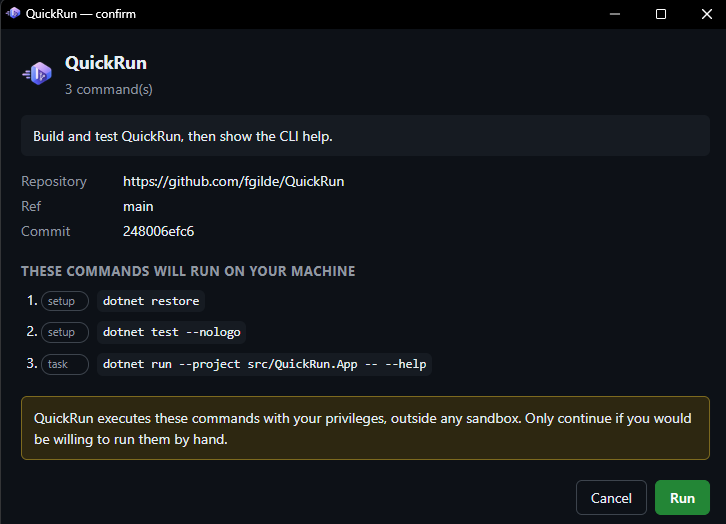
The command list appears in a window a web page cannot overlay. What you approve is what runs, and a secret is never sent back to the page that asked for it.
No quickrun.yml? QuickRun detects Docker Compose, npm scripts, .NET, Python, Rust, Go, Java, Procfile, Pinokio and more - including the port it should then wait for.
An editor with schema completion, checked by the same parser a run uses, and a test run against the real repository - with a Stop that works, without leaving the tab.
Everything a run started belongs to one group, including an application whose parent process is long gone. If something is left running, it says so - and ends it.
A tray icon with a local UI, or quickrun run owner/repo in a shell. The same runs, the same workspaces, the same confirmation.
To make your own repository runnable, commit a quickrun.yml next to it. It names the tools it needs, what to prepare, what to run, and how to tell that it is up. Without one QuickRun reads the repository and proposes something itself - and says in the window that it guessed.
name: QuickRun
description: Build and test QuickRun, then show the CLI help.

requires:
  - tool: dotnet
    version: ">=10.0"
    install: https://dot.net

setup:
  - dotnet restore
  - dotnet test --nologo

tasks:
  - name: cli
    run: dotnet run --project src/QuickRun.App -- --help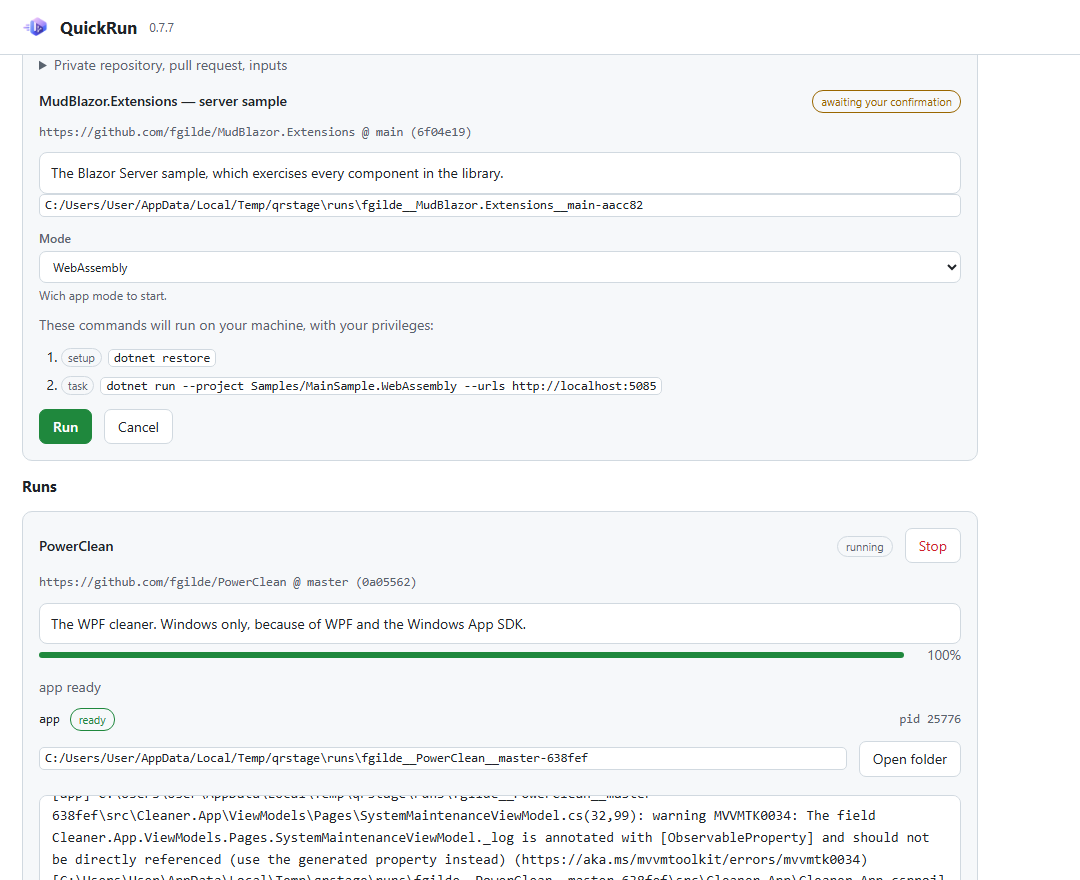
One binary, no installer required. Then type quickrun once and the window and the tray come up. Autostart is a switch in Settings.
winget install fgilde.QuickRunChrome, Edge, Firefox or Opera. It talks only to 127.0.0.1 and is recognised by its origin, which no web page can forge.
Read the plan, approve it, watch it. The address opens once the application is up.
quickrun run owner/repoAll from a real run of a real repository. Click to enlarge.
QuickRun runs code from repositories you did not write. So the confirmation cannot be skipped, the command list lives in a window outside the page, every line that comes from a repository is treated as text and never as HTML, and the listener on 127.0.0.1 accepts only callers whose origin the browser itself sets.
Installing takes longer than the first run does.
